 SocialAgent
How to automate social media without losing control
Automation should take the repetitive work off your plate — drafting, resizing, scheduling, publishing on time — while you keep the decisions that shape your brand. Here is how to set it up in an afternoon.
Free plan · Bring your own AI key · Approval before anything publishes
The short answer
To automate social media, save your brand details once, connect your social accounts to a scheduling tool, choose posting days and times, and let AI prepare drafts ahead of time. Review the drafts in a queue, approve them, and the tool publishes each post at its scheduled time.
Automate the production and the publishing. Keep a human approval step for anything that goes out under your name, at least until you trust the output.
How to automate your social media in five steps
The same order works whether you post twice a week or every day.
-
Write down your brand once
Describe what you do, who you want to reach, your tone of voice and the topics you post about. Good automation reads this every time, so you stop re-explaining your brand in every prompt.
-
Connect your channels
Link the accounts you publish to through each platform’s official sign-in. Instagram needs a Business or Creator account; LinkedIn and Facebook publishing is for Pages.
-
Pick a realistic rhythm
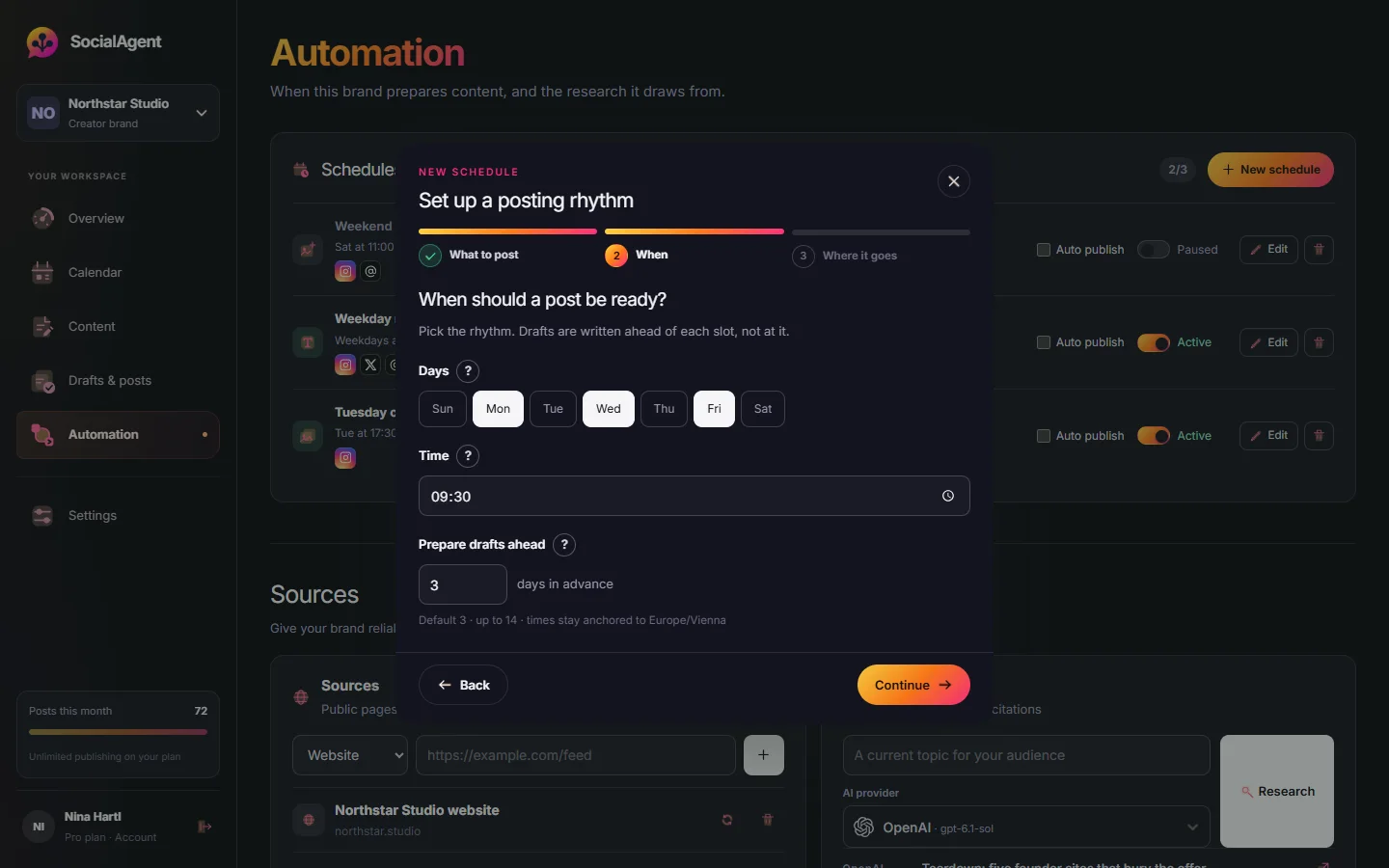
Choose posting days, times and a timezone. Three good posts a week beat seven rushed ones, and a rhythm you can keep is what makes automation pay off.
-
Let AI prepare drafts ahead
Have drafts written and designed days before they are due, with a version for each channel. You get time to review instead of writing against the clock.
-
Review, approve, and let it publish
Approve the drafts you like, edit the ones you do not, and the approved posts publish on schedule. Check the publishing result for each account.
Automate the routine, keep the judgment
Automate: first drafts
Captions, hooks, carousel copy and image ideas written from your brand profile. Editing a draft is faster than facing a blank page.
Automate: channel versions
One idea rewritten for Instagram, LinkedIn, X and the rest, each within its own character limit and conventions.
Automate: publishing on time
Posts go out at the scheduled time in your brand’s timezone, even when you are busy, asleep or on holiday.
Keep: approval
A person should read what goes out under your name. Approval-first tools hold every draft until you say yes.
Keep: replies and DMs
Conversations are where trust is built. Automated replies tend to read as automated, so answer people yourself.
Keep: timely and sensitive topics
News, crises and anything that could land badly need human timing. Pause the schedule when the moment is wrong.
Recurring schedules that prepare drafts for you
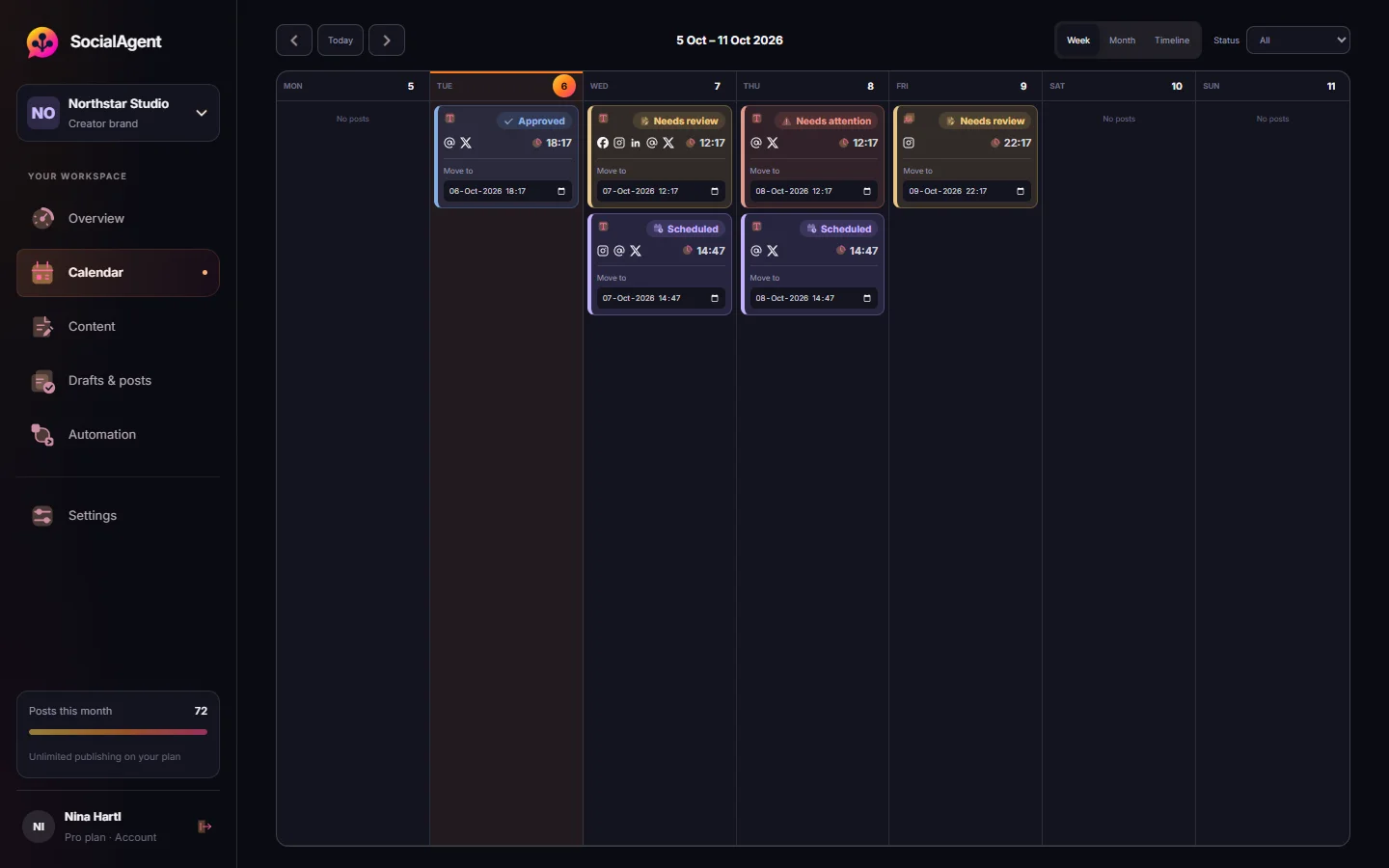
Set posting days, times and a timezone for each brand. SocialAgent prepares drafts 1–14 days ahead, then publishes the posts you approved at the scheduled time.
- Review is the default; automatic publishing is an opt-in per schedule
- Editing an approved post sends it back for approval
- A notice when a post needs your attention or a publish fails
Full automation or approval-first?
There are two ways to run automated social media. In full automation, posts are generated and published without anyone reading them. In approval-first automation, everything is prepared automatically but waits for a person to approve it.
Full automation is tempting, and for some recurring formats it works. But AI drafts still make mistakes: a wrong date, a claim your business cannot back up, a tone that is slightly off. On social media those mistakes are public. Approval-first keeps almost all of the time savings — reviewing a ready post takes a minute — and removes most of the risk.
A good middle ground is to start approval-first, watch the drafts for a few weeks, and only switch on automatic publishing for a schedule whose output you already trust.
A weekly routine that takes about 30 minutes
- Monday: open the review queue and read the drafts prepared for the week.
- Edit or regenerate anything that does not sound like you. Add a personal detail where it helps.
- Approve the posts. Check the preview for each channel, especially images and carousels.
- Through the week: reply to comments and messages yourself. Glance at publishing results.
- Friday: note what performed well and add those topics to your brand profile.
Mistakes that make automated accounts look automated
- Posting the identical caption on every platform, hashtags and all.
- Publishing at the same minute every day, in a timezone your audience does not live in.
- Letting AI invent facts, statistics or quotes without a source.
- Never replying. Automation is for publishing, not for conversations.
Common questions
Can I automate my social media for free?
Yes. SocialAgent’s Free plan includes one brand and 15 published posts a month across all six channels, with unlimited AI generations on your own AI key. Your AI provider bills its usage separately.
Is it safe to automate social media posts?
It is safe when you connect accounts through official platform sign-in and keep an approval step. SocialAgent never asks for your social passwords, and every post waits for your approval unless you opt in to automatic publishing for a schedule.
Will automated posts hurt my reach?
Platforms do not penalise posts because they were scheduled through an official API. What hurts reach is low-quality or repetitive content, so review drafts and give each channel its own version.
How far ahead should I schedule posts?
One to two weeks is a good window: far enough to stay ahead, close enough to stay relevant. SocialAgent can prepare drafts 1–14 days before they are due.
Which platforms can I automate?
SocialAgent publishes to Instagram, Threads, X, TikTok, LinkedIn Company Pages and Facebook Pages.
Related guides and tools
Social media automation you can trust
Automate social media posting with AI: recurring schedules that prepare drafts ahead, a review queue, and publishing to six platforms on time. Free plan available.
Read more →How to schedule social media posts from one calendar
How to schedule posts on Instagram, TikTok, LinkedIn, Facebook, Threads and X from one calendar, with the account types, time zones and limits to check first.
Read more →Approval-first publishing: stop before the post goes out
Fully automated posting fails in ways that are public and expensive. Approval-first keeps the labour savings and puts a human at the one step that matters.
Read more →How to build a content calendar you will actually keep using
Most content calendars are abandoned within a month. A four-week, angle-balanced, batch-friendly plan survives — here is how to build one.
Read more →Best Time to Post Planner
A starting posting schedule in your own timezone, built from your audience type and how often you can post.
Read more →An AI social media manager that asks before it posts
An AI social media manager that learns your brand, suggests ideas, writes and designs posts, and publishes them on schedule — with you approving every post.
Read more →Create your next post with AI
Free plan with 15 published posts a month. Bring your own AI key and review every post before SocialAgent publishes it.